




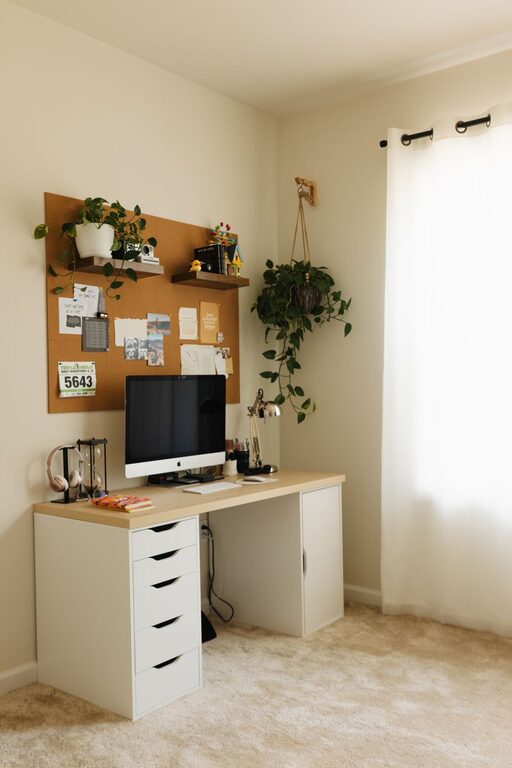
Creating a comfortable and productive home office space is essential, especially as more people embrace remote work or flexible schedules. A well-designed workspace can improve focus, reduce stress, and make your workday more enjoyable. Whether you have a dedicated room or a small corner, the following tips will help you set up an effective home office that suits your needs and lifestyle.
1. Choose the Right Location
Selecting the right spot for your home office is the foundation of creating a productive environment.
Consider Natural Light
Aim for a space with plenty of natural light. Exposure to daylight can boost your mood and energy levels while reducing eye strain. If possible, position your desk near a window but avoid glare directly on your screen.
Minimize Noise and Distractions
Choose a quiet area away from household traffic, noisy appliances, or TV noise. If this is not possible, noise-cancelling headphones or soft background music might help maintain focus.
Ensure Privacy
If your work involves calls or video meetings, pick a spot where you won’t be disturbed. You might also use room dividers or screens to create a visual boundary in an open space.
2. Invest in Ergonomic Furniture
Comfort is key to preventing fatigue and maintaining productivity throughout the day.
Ergonomic Chair
Select a chair that supports good posture with adjustable height, lumbar support, and comfortable cushioning. Sitting correctly prevents back and neck pain.
Adjustable Desk
An adjustable desk allows you to change its height, which can encourage movement between sitting and standing. Standing desks or sit-stand converters provide flexibility and promote better circulation.
Proper Desk Size
Make sure your desk has enough surface area to hold your computer, notepads, and other essentials without feeling cramped.
3. Optimize Your Lighting
Good lighting improves focus and reduces eye strain.
Layer Your Lighting
Use a combination of ambient light (overhead), task lighting (desk lamp), and natural light. A desk lamp with adjustable brightness and color temperature is ideal for detailed work.
Avoid Harsh Lighting
Steer clear of overly bright or flickering lights. Soft, warm lighting creates a comfortable atmosphere conducive to concentration.
4. Organize Your Workspace
An organized desk helps clear your mind and speeds up workflow.
Declutter Regularly
Keep only frequently used items within arm’s reach. Store other materials in drawers or shelves to reduce visual clutter.
Use Storage Solutions
Invest in drawer organizers, filing cabinets, and storage boxes to keep papers and office supplies tidy.
Cable Management
Tidy cables with clips, sleeves, or under-desk trays to avoid tangles and a chaotic look.
5. Personalize Your Space
Adding personal touches can increase motivation and make your office feel inviting.
Inspirational Items
Include artwork, motivational quotes, or plants to create a positive atmosphere.
Keep Comfort Items Nearby
A small blanket, comfortable slippers, or a favorite mug can make your workspace cozier.
6. Take Breaks and Move
Movement supports physical and mental well-being during long periods at your desk.
Schedule Breaks
Set timers or reminders to stand up, stretch, or take a short walk every hour.
Incorporate Movement
Use a balance ball chair or desk treadmill if feasible, or practice simple desk exercises.
7. Ensure Good Air Quality
Fresh air helps maintain alertness.
Ventilation
Open windows regularly or use an air purifier to circulate clean air.
Indoor Plants
Plants not only brighten the room but can also improve air quality and reduce stress.
8. Use Technology Wisely
Equip your home office with tools that enhance productivity.
Reliable Internet
A stable, high-speed internet connection is essential for video meetings and online work.
Efficient Hardware
Use a computer, monitor, keyboard, and mouse that suit your tasks and comfort requirements.
Productivity Apps
Take advantage of apps for task management, communication, and calendar organization.
—
Creating an effective home office is a process that combines comfort, organization, and personal style. Paying attention to ergonomics, lighting, and decluttering sets the foundation, while personalization and healthy habits support your well-being and success. With these tips, you can build a workspace that helps you stay focused and inspired every day.



More Stories
Tips for Creating a Cozy Reading Nook at Home
Tips for Creating a Relaxing Home Workspace to Boost Productivity
Tips for Creating a Cozy and Inviting Home Office Space